
Already have iTEMP hardware? Start with the model.
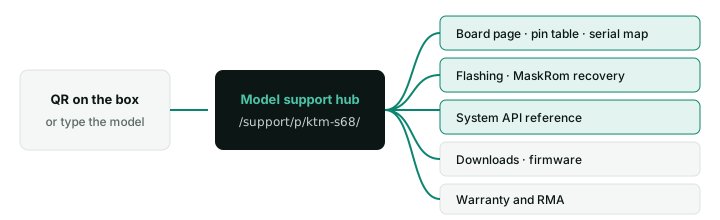
Enter the model printed on the label — or scan the QR on the box — to get its documentation, firmware and warranty service in one place.
Four ways to get unstuck.
Developer wiki
Board pages, flashing, MaskRom recovery, the system API and on-device AI.
Downloads
Firmware images, spec sheets, drawings and the catalogue.
Warranty & RMA
Hardware fault? Start a return with your model and serial number.
Contact an engineer
Integration or firmware question the wiki doesn't answer.
Files for your hardware
Files are being prepared. Flashing tools and guides are already in the wiki; for firmware images, contact an engineer.
Support questions
Where do I find documentation and firmware for the model I have?
Enter the model printed on the label — or scan the QR code on the box — on the support page. The model hub links the board’s wiki page, flashing and recovery guides, the system API, downloads and warranty service.
Can I read the documentation before I buy?
Yes. The developer wiki is public, with no account and no NDA: board pin tables and serial maps, flashing and MaskRom recovery, the full system API and on-device AI guides. Engineers usually check it before choosing a board.
The board powers on but the screen stays black. Where do I start?
Attach a serial console first — the boot log tells you whether the board boots and the problem is the display, or whether it stops earlier.
- Boots fine (adb works) → check the panel cable, the panel’s power and backlight, and that the firmware is configured for your panel.
- Stops in the log → note the last lines and follow recovery if needed.
- No log at all → check the power supply and the serial wiring.
How do I connect to the serial debug console?
Use a 3.3 V USB-to-TTL adapter on the board’s debug UART: GND to GND, adapter TX to board RX, adapter RX to board TX — leave VCC unconnected.

Rockchip boards use 1,500,000 baud, 8N1, no flow control by default — not 115200, which shows garbage. Some adapters (older PL2303) cannot reach that speed; CH340-based adapters with PuTTY or picocom work well. The debug header location is on your board page.
adb devices shows nothing. What should I check?
- Connect the USB OTG / device port — USB-A host ports do not carry adb.
- Use a data cable, not a charge-only one.
- Make sure USB debugging is on:
ItempApiPub.setUsbDebug(context, true), checked withgetUsbDebugStatus. - Accept the “Allow USB debugging” prompt on the screen if it appears.
- Alternatively use adb over the network.
What logs should I send with a support request?
- The firmware version:
adb shell getprop ro.itemp.firmware.version. - The app log:
adb logcat -d > logcat.txtright after the problem. - For boot or crash problems: the serial console log from power-on.
- The model, serial number and what changed before it started.
autoLogCatch(context, true) records logs continuously for problems that are hard to reproduce — switch it off afterwards, it fills storage. Send everything through Contact an engineer.
How does the warranty and RMA process work?
- Check the basics: power, cables and a reflash — MaskRom recovery fixes most boot problems.
- Send model, serial number and symptoms through the engineer form, with a photo of the label if possible.
- Diagnosis: an engineer confirms whether it is a hardware fault and issues an RMA number.
- Repair or replace: ship the unit with the RMA number.
Start at Warranty & RMA. Warranty terms for your order are stated in your quotation.
Where can I find a board’s pin table, serial map and dimensions?
On the board’s page in the public developer wiki — no account, no NDA. Each page lists the SoC, Android version, I/O, connector pinouts and size. Start at Boards, or enter your model on the support page.
How do we update firmware on devices already installed in the field?
Our firmware supports OTA updates, so you can ship signed firmware updates to deployed devices without visiting them; for small fleets on site, an SD card or USB flash also works. For custom firmware we prepare the update packages for your build. See OTA updates, or ask us to set up an update plan for your fleet.
How do I check which firmware version a device is running?
Run:
adb shell getprop ro.itemp.firmware.versionQuote this value in every support request. The wiki is versioned per firmware release — pick yours in the version selector. If your build number is not listed, the device runs a custom image made for your project; ask your account manager for its notes.
If the hardware is at fault.
- Check the basics
Power, cables, and a reflash — the MaskRom guide in the wiki fixes most boot problems.
- Send model, serial and symptoms
Use the engineer form below; attach a photo of the label if you can.
- Diagnosis
An engineer confirms whether it is a hardware fault and issues an RMA number.
- Repair or replace
Ship the unit with the RMA number; we repair or replace it.
Tell us the model and what happens.
Goes to our technical team, not sales.